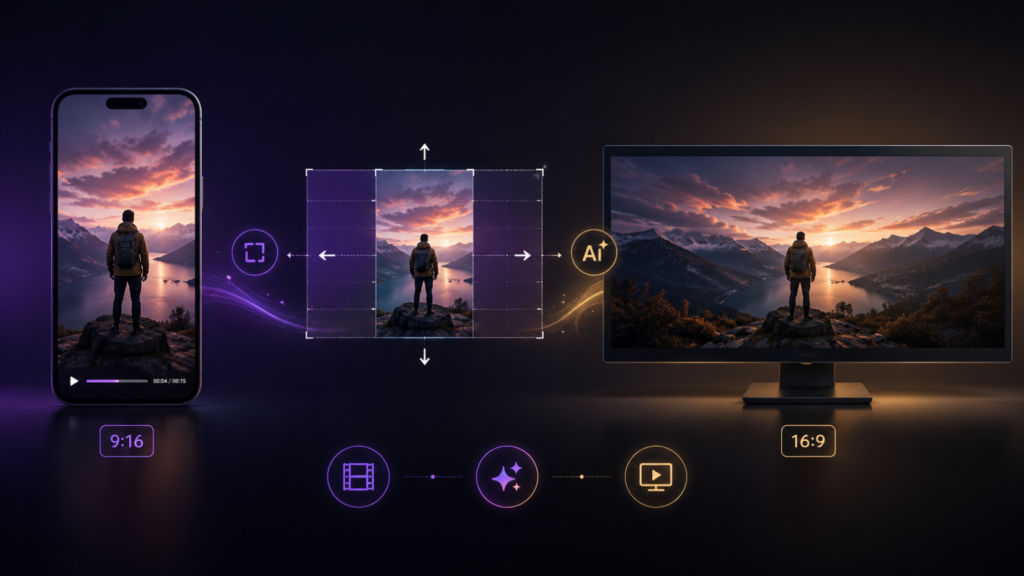
A portrait to landscape video converter solves a less common but very real problem: content that was shot vertically – a phone recording, a TikTok-native clip, a mobile interview – now needs to exist in a horizontal frame for a broadcast package, a YouTube upload, or a traditional landscape deliverable. It’s the mirror image of the much more common horizontal-to-vertical conversion, and it comes with its own specific challenge: filling space that was never part of the original shot, rather than cropping space away.
Why This Direction Is Different
Converting horizontal to vertical is fundamentally a cropping decision – narrowing an already-wide frame down to a taller one, choosing what to keep. Converting portrait to landscape is closer to an expansion problem: a vertical frame is narrow by design, and stretching it wide means either distorting the image or generating new content to fill the space on either side. There’s no way to “crop into” more width that was never captured.
The Options, Realistically
Pillarboxing – placing the vertical video centered in a landscape frame with bars on either side – is the safest, most honest option, and it’s genuinely appropriate for broadcast-legal delivery where content integrity matters more than filling the frame. It does waste a significant portion of the visible canvas, which is why it’s rarely used for anything audience-facing beyond a strict broadcast requirement.
Stretching the vertical frame to fill landscape width distorts every proportion in the shot immediately and is almost never the right call for anything but the most disposable use case.
AI-based extension – generating new, contextually consistent visual content on either side of the original vertical frame – is the only approach that can produce a landscape frame that doesn’t look like a vertical video with bars, or a stretched, distorted version of the original. This uses the same underlying context-aware principle behind horizontal-to-vertical conversion, applied in the opposite direction.
When You Actually Need This
This conversion shows up in specific, recurring situations: a vertical creator’s clip needs to run inside a horizontal broadcast package, a phone-shot testimonial needs to sit inside a landscape corporate or documentary piece, or vertical-native ad creative needs a horizontal cutdown for a placement that requires it. It’s rarely a primary content decision – it’s almost always a secondary deliverable requirement that shows up after the vertical content already exists and has proven itself.
Setting Expectations Before You Start
Because this conversion involves generating or padding content that was never captured, the result will never be identical to footage shot natively in landscape. The realistic goal is a landscape version that doesn’t visibly betray its vertical origin – not a perfect recreation of what a landscape camera would have captured. Reviewing reference examples of AI-extended frames before committing to a workflow helps set the right expectation for what “good” looks like for this specific conversion.
Choosing a Converter for This Direction Specifically
Because portrait-to-landscape is the less common conversion direction, many tools that handle horizontal-to-vertical well were never built or tested for the reverse. Before relying on a tool for this specific conversion, confirm it explicitly supports frame extension or generation – not just cropping – since a crop-based tool applied to this direction typically just produces pillarboxing by default, whether or not that’s what you actually wanted.