They sound similar and the marketing blurs them, but an AI video generator and an AI video editor solve opposite problems. Knowing which you need saves money and frustration.
Search for AI video tools and you will find generators and editors described in nearly identical language. They are not the same. One creates footage that did not exist; the other refines footage you already have. Buying the wrong one is one of the most common – and costly – mistakes in AI video.
This guide draws the line clearly: what each does, when you need which, and how they work together in a modern workflow.
What an AI Video Generator Does
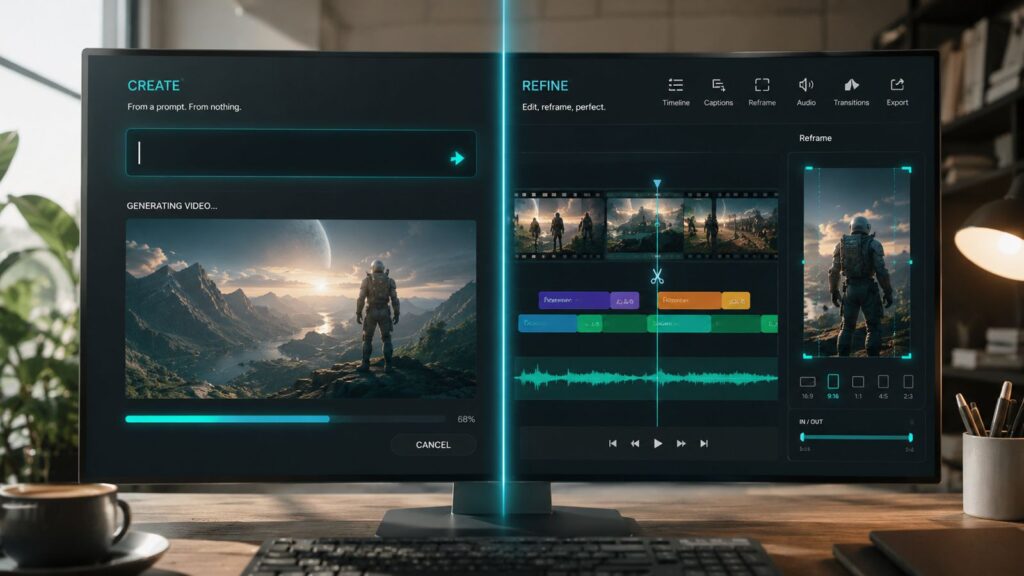
An AI video generator creates new footage from a prompt – text or images – producing video that never existed before.
You give a generator a description or reference and it produces original moving footage. There is no source clip; the output is created from scratch. This is the tool you reach for when you need a shot you do not have and cannot easily film.
Generators are about creation. Their value is making the impossible or impractical shot achievable without a camera.
What an AI Video Editor Does
An AI video editor refines footage you already have – cutting, captioning, reframing, and assembling – using AI to speed manual work.
An editor starts with existing footage and helps you shape it: trimming, adding captions, removing backgrounds, reframing, assembling. The AI accelerates tasks you would otherwise do by hand. The footage already exists; the tool improves it.
Editors are about refinement. Their value is turning raw or rough footage into a polished result faster.
When You Need Which
Need footage that doesn’t exist? You want a generator. Need to polish footage you have? You want an editor.
If your problem is “I don’t have this shot,” a generator solves it. If your problem is “I have footage but it needs work,” an editor solves it. Many projects involve both problems, which is why the tools complement rather than replace each other.
The mistake is buying an editor when you needed to create, or a generator when you needed to refine. Diagnose the problem first.
How They Work Together
The strongest workflows generate footage and then edit it – and the most efficient tools handle both sides of that arc.
A common modern flow: generate the footage you lack, then edit everything into a finished piece, then reformat for distribution. Generation and editing are sequential stages of one workflow, not competing choices.
BigIdea is built to span this arc – generating and assembling toward a complete piece – so you are not bolting a generator and an editor together by hand.
| Related reading on CineVision |
| Create and finish in one workflow. See how BigIdea spans generation to complete production. Explore CineVision BigIdea. |